

 The Microsoft Jet database engine cannot find the input table or query 'Status'...
Message:
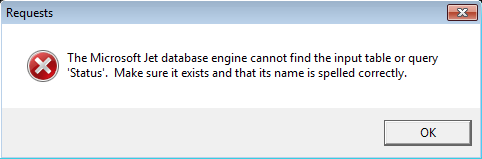
The Microsoft Jet database engine cannot find the input table or query 'Status'. Make sure it exists and that its name is spelled correctly.
Diagnostic:
When you activate the Requests Notice (Alarm) or run the Requests Manager, the following message appears: "The Microsoft Jet database engine cannot find the input table or query 'Status'. Make sure it exists and that its name is spelled correctly."
Cause:
The table named 'Status' not exists within the database Requests.mdb, or has a different name.
Solution:
A) Compact and repair your database with MS-Access
NOTE: Make sure that the database is not in use.
- Perform a backup of your database (Requests.MDB).
- Open your database with Microsoft Access.
- Click File menu and select Compact and Repair Database option.
- Work normally.
B) Load a previous backup of your database
- Ask for a recent backup of the database, to the IT Department of your company.
- Replace your database with the backup and check it works properly.
We strongly recommend that you backup your database (Requests.MDB) periodically.
At the Requests.mdb database, the maintenance requests reported by the users are stored, and is fully independient of the databases managed by the MP programs (*.M91), which means that this module can be installed at the same PC where the MP is installed or in any other PC within the same network, or even on an Internet server.
C) Request a quotation for the repair of your database
If you have some difficulties to repair your database you can contact us to get a quotation.
Were you able to solve the problem? Yes or No
A) Maybe you had any of the following problems
| "Data provider or other service returned an E_FAIL status." |
| "Exception EFCCreateError in module mpsrm.dll" |
B) We recommend that you read these related topics
If the information provided was helpful, don't forget give us a Like in our Facebook page.

 is a trademark of